

Zoho CRM
Official integration, by Callizy
Every call on the Zoho contact, playable in Zoho
Callizy connects your phone to Zoho CRM. Every call becomes a Zoho call on the contact: type, duration, summary and transcript in the description. The recording plays right inside Zoho, and the file is attached to the contact record. Texts become notes.
- Plans
- Team and Business, included
- Category
- CRM
- Tool
- Zoho CRM
Zoho CRM/ContactsKarim Haddad
Haddad Import inc.
- Phone
- (450) 555-0191
- Lead source
- Inbound call
Inbound call · 3 min 47 s
Yesterday, 4:52 p.m.
Description
Karim asks for a price on 200 cases delivered to Laval. Call back tomorrow morning with the quote.
Note added · 3 days ago
Call from Karim Haddad
Yesterday, 4:52 p.m. · 3 min 47 s
Playable in Zoho, file attached
Logged in Zoho CRM
Both ways, nothing to type
Contacts go both ways, whether Zoho is hosted in Canada, the US or Europe. A “Call with Callizy” button on the record starts the call.
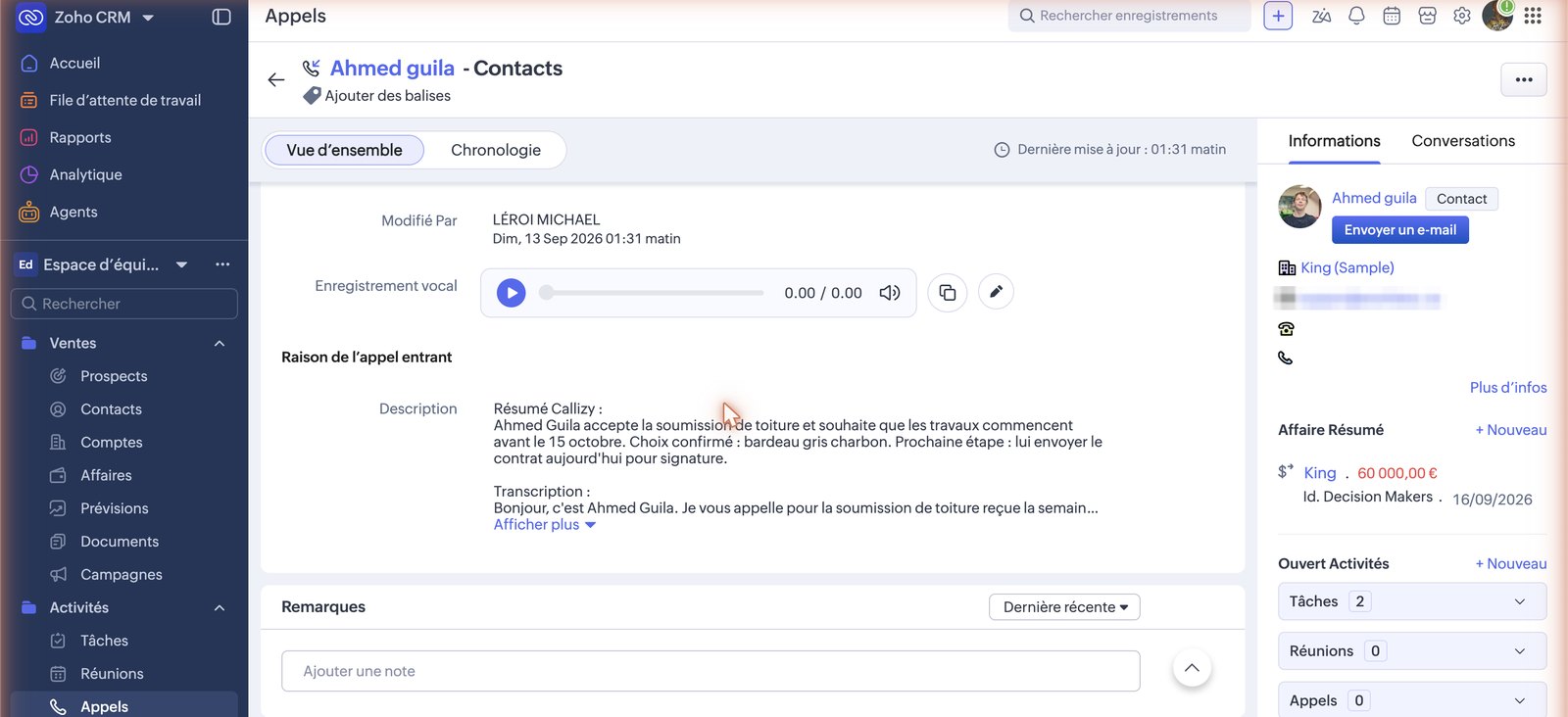
The call in Zoho: the audio player, the summary and the transcript.
A manager connects the tool once
After that, every team call is logged on its own.
Connect Zoho CRM
- 1
Open Callizy integrations
In Callizy, Configuration menu, then Integrations. Click the Zoho CRM card, then Connect Zoho CRM.
- 2
Accept in Zoho CRM
The Zoho CRM screen opens. Sign in with an admin account and accept. You come back to Callizy and see “Connected to …”.
- 3
That is it
One person connects, for the whole company. After that, every call from every team member is logged. The settings at the bottom of the panel can be changed at any time.
Create the “Call with Callizy” button
An admin creates it once, for the whole organization. The small green phone next to the number is Zoho’s, not Callizy’s.
- 1
Contacts module buttons
Gear, Setup, Customization, Modules and Fields, Contacts, Buttons tab, Create a custom button.
- 2
Name, action, placement
Name: Call with Callizy. Action: Invoke a URL. Page: In the record. Position: Details.
- 3
Paste the address, then add the Phone field
In URL, paste this address. Cursor after the equals sign, then in Fields: Contacts, Phone. Zoho inserts the token itself; do not type it by hand.
- 4
New tab, all profiles, Save
Button action layout: New tab. Profiles: Administrator and Standard. The button is on the record, next to “Edit”.
You choose what gets logged
In the Callizy Zoho CRM panel. A manager changes them at any time.
Calls and voicemails on the record
Every completed or missed call and every voicemail, with duration, summary, transcript and recording.
Texts on the record
Texts received and sent.
Create unknown contacts
A missing caller becomes a contact, with the Callizy name when there is one.
Import contacts
A contact created or edited in the tool reaches the Callizy address book within seconds. A deleted contact is archived.
Frequently asked questions
You might also want
All integrations
HubSpot
Every call on the right HubSpot record, with the summary

Pipedrive
Every call as a Pipedrive call log, with the recording

Clio
Every call on the Clio matter, and its time billed

Google Contacts
Your Google contacts and your Callizy address book, always in step

Slack
Missed calls, voicemails and texts, in your Slack channel

Google Calendar
The AI agent books appointments in Google Calendar, during the call

Microsoft 365
The AI agent books appointments in Microsoft 365, during the call

Square Appointments
The AI agent books straight into Square Appointments

Wix Bookings
The customer calls, the booking is in Wix


Claude, ChatGPT
Callizy in your AI assistant, through the MCP server.