

Clio
Official integration, by Callizy
Calls, texts and billed time, on the Clio matter
Callizy connects your phone to Clio Manage. Every call and every voicemail becomes a phone communication on the contact, tied to their most recent open matter, with the summary, the transcript and the recording. Texts received and sent too.
- Plans
- Team and Business, included
- Category
- Legal
- Tool
- Clio
Clio/ContactsIsabelle Roy
Client · matter 00012
- Phone
- (514) 555-0177
- Matter
- 00012 · Roy v. Labelle
Inbound call · 12 min 34 s
Today, 9:15 a.m. · matter 00012
Summary
Ms. Roy confirms she received the demand letter. She will send the site documents by Monday.
Email received · yesterday
Call from Isabelle Roy
Today, 9:15 a.m. · 12 min 34 s
Communication and billable time on the matter
Logged in Clio
Both ways, nothing to type
If you turn it on, Callizy prepares the billing: a time entry for each call, at the lawyer’s rate, and a flat-rate line for each text. Recordings go into the matter documents, and Clio contacts come into the Callizy address book.
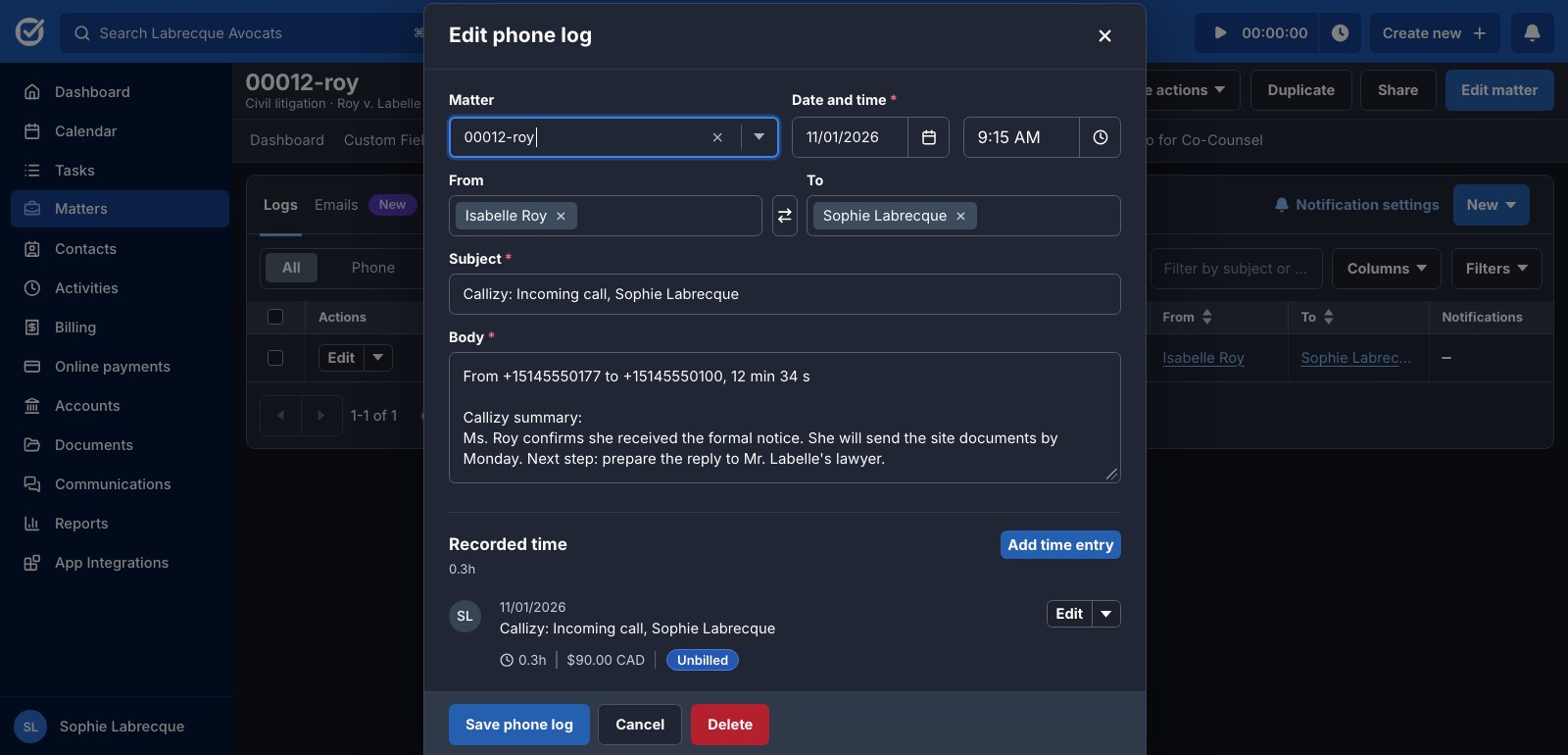
The communication on the matter, with the summary and the recorded time.
A manager connects the tool once
After that, every team call is logged on its own.
Connect Clio
- 1
Open Callizy integrations
In Callizy, open Administration, then Settings and Integrations. Click the Clio card, then Connect Clio.
- 2
Accept in Clio
The Clio screen opens. Sign in with an admin account and accept. You come back to Callizy and see “Connected to …”. First pick your account region: Canada (ca.app.clio.com), United States (app.clio.com), Europe or Australia.
- 3
That is it
One person connects, for the whole company. After that, every call from every team member is logged. The settings at the bottom of the panel can be changed at any time.
Choose what goes to Clio
- 1
The lines
Under Lines sent to Clio, uncheck a line so that none of its calls, voicemails or texts go to Clio. A new line is checked automatically.
- 2
The switches
On by default: Calls and voicemails on the contact, Texts on the contact, Create unknown contacts, Import Clio contacts and Recordings in the matter.
Bill call time
Off by default: you decide what gets billed.
- 1
Turn on “One time entry per call”
Every call answered by someone at the firm becomes a time entry on the matter, with the summary as the note. Billable if the matter is billed hourly, non-billable if it is flat fee or contingency. Clio applies the lawyer’s rate: Callizy sends no amount.
- 2
Pick the rounding
6 minutes (0.1 h), the default, 15 minutes (0.25 h) or To the minute. A started block counts: a 95-second call gives 6 minutes.
- 3
Link each member to their Clio account
Under Time for each member: the time goes to the member who answered or placed the call, at their rate. Without a linked account, the call is logged with no time.
Bill texts
Off by default, like call time.
- 1
Create flat-rate categories in Clio
In Clio, Settings, then Activity categories: for example “Text received” at $2 and “Text sent” at $4, at a flat rate.
- 2
Turn on “One billed line per text”
Under Clio categories for texts, pick the category for Text received and the one for Text sent. Each text received from a client or written by someone at the firm becomes a line on the matter, and Clio calculates the amount. Never for an AI agent text.
You choose what gets logged
In the Callizy Clio panel. A manager changes them at any time.
Calls and voicemails on the contact
Every completed or missed call and every voicemail becomes a phone communication, with duration, summary, transcript and recording link.
Texts on the contact
Every text received or sent becomes a communication on the matter, or on the contact without a matter. Only for a contact already in Clio.
Create unknown contacts
After a real conversation or a voicemail, a caller missing from Clio becomes a contact. A missed call or a text alone does not create one.
Import Clio contacts
Clio contacts with a phone number come into the Callizy address book, then every change in Clio is carried over. A contact deleted in Clio is archived.
Recordings in the matter
Every recording and every voicemail is saved in the matter documents, in a “Call recordings” folder.
One time entry per call
For every call answered by someone at the firm, rounded to the chosen block, at the member’s rate. Never for a missed call, a voicemail or the AI agent.
One billed line per text
At the flat rate of the chosen category. A received text goes to the responsible attorney, a sent text to its author’s Clio account. An open matter is required.
Clio Grow: new callers
After a call answered by the AI agent, a new caller looking for a lawyer lands in your Clio Grow lead inbox, with a summary and a link to the call.
Frequently asked questions
You might also want
All integrations
HubSpot
Call and text without leaving HubSpot. Everything lands on the record.

Pipedrive
Call and text without leaving Pipedrive. Everything lands on the record.

Zoho CRM
Every call on the Zoho contact, playable in Zoho

Google Contacts
Your Google contacts and your Callizy address book, always in step

Slack
Missed calls, voicemails and texts, in your Slack channel

Google Calendar
The AI agent books appointments in Google Calendar, during the call

Microsoft 365
The AI agent books appointments in Microsoft 365, during the call

Square Appointments
The AI agent books straight into Square Appointments

Wix Bookings
The customer calls, the booking is in Wix


Claude, ChatGPT
Callizy in your AI assistant, through the MCP server.