

Google Calendar
Official integration, by Callizy
The AI agent books appointments in Google Calendar, during the call
The customer calls, the AI agent looks at your real availability in Google Calendar, offers a slot and books it. The appointment shows up in your calendar with the customer’s name and number, and the customer gets a confirmation by text.
- Plans
- With AI agents
- Category
- Appointments
- Tool
- Google Calendar
Clinique Physio Rive-SudFollow-upFollow-up
Luc Fortin
MassageMassage
Nathalie Roy
AssessmentAssessment
Alexandre Côté
Follow-upFollow-up · Marie-Ève
Follow-upFollow-up
Pierre Lavoie
AssessmentAssessment
Jean Tremblay
NewCall from Jean Tremblay
Monday, 7:40 p.m. · the AI agent answers
Assessment · Wednesday 2 p.m.
Booked in Google Calendar
Text to Jean
Your assessment is confirmed for Wednesday at 2 p.m. See you soon!
Real slots, never two customers at the same time
You set the opening hours, the duration and the buffer between two appointments. The agent never offers a slot already taken, even one just added by hand in the calendar. If you allow it, it also cancels or moves an existing appointment.
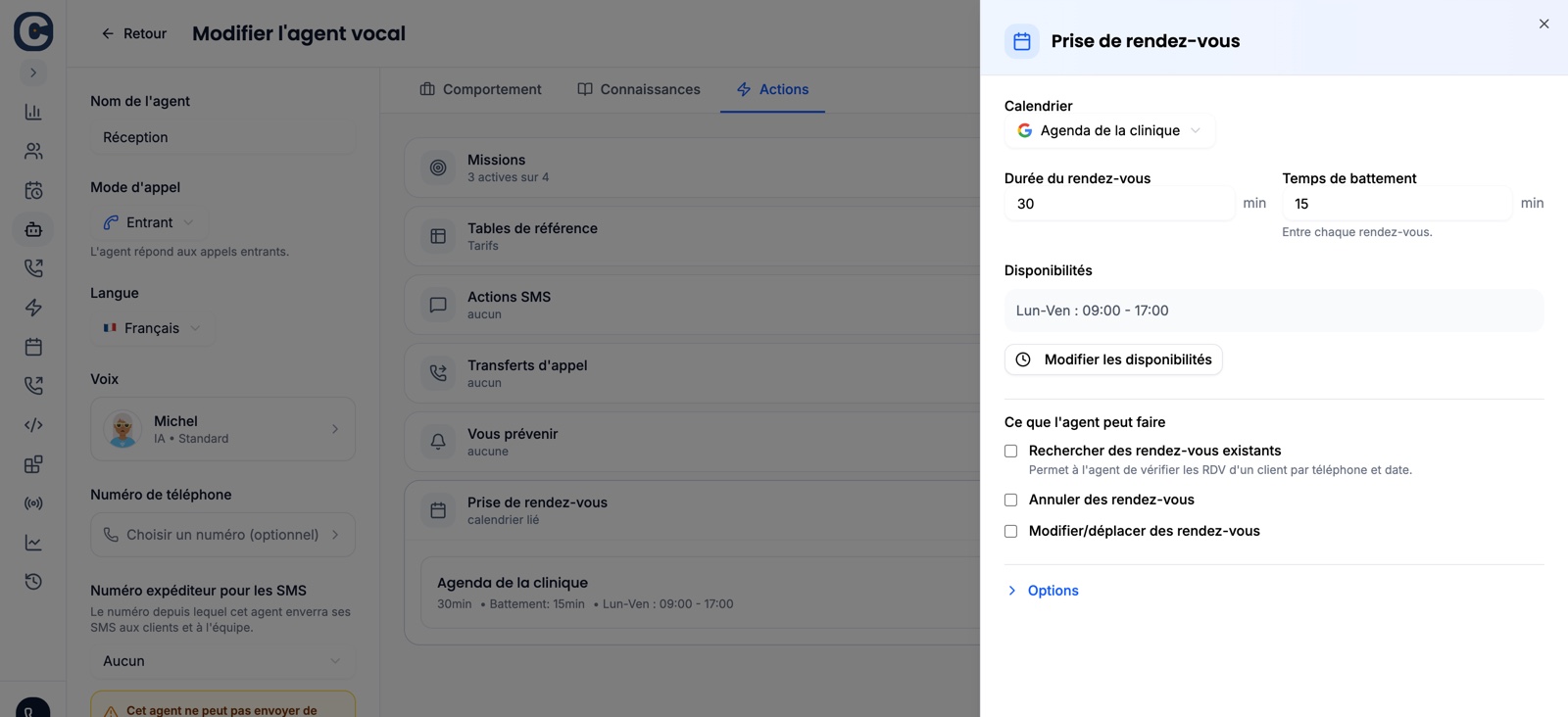
The agent’s appointment booking: the calendar, the duration, the hours, what it is allowed to do.
Two minutes, once
A manager connects the calendar, then gives it to the AI agent.
Connect Google Calendar
- 1
Open Callizy calendars
In Callizy, Calendars menu, then Connect a calendar. Pick Google Calendar and give it a name.
- 2
Accept in Google Calendar
The Google Calendar screen opens. Sign in and accept. You come back to Callizy. Check access to your calendar on the Google screen. You can connect several Google calendars, one per person.
Give it to the AI agent
- 1
Open the agent
AI agents menu, your agent, Actions tab, Appointment booking row.
- 2
Pick the calendar
Select it in the list, set the opening hours and the duration, save. From the next call, the agent offers slots and books.
You decide how it books
In the AI agent, Appointment booking row. It can be changed at any time.
Opening hours
Day by day. The agent offers nothing outside them.
Duration and buffer
How long an appointment lasts and the time kept between two.
Cancel and move
Whether the agent can cancel or move an existing appointment. Off by default.
Confirmation text
The customer gets the date, time and address by text, as soon as the call ends. You can be notified too.
Frequently asked questions
You might also want
All integrations
HubSpot
Every call on the right HubSpot record, with the summary

Pipedrive
Every call as a Pipedrive call log, with the recording

Zoho CRM
Every call on the Zoho contact, playable in Zoho

Clio
Calls, texts and billed time, on the Clio matter

Google Contacts
Your Google contacts and your Callizy address book, always in step

Slack
Missed calls, voicemails and texts, in your Slack channel

Microsoft 365
The AI agent books appointments in Microsoft 365, during the call

Square Appointments
The AI agent books straight into Square Appointments

Wix Bookings
The customer calls, the booking is in Wix


Claude, ChatGPT
Callizy in your AI assistant, through the MCP server.