
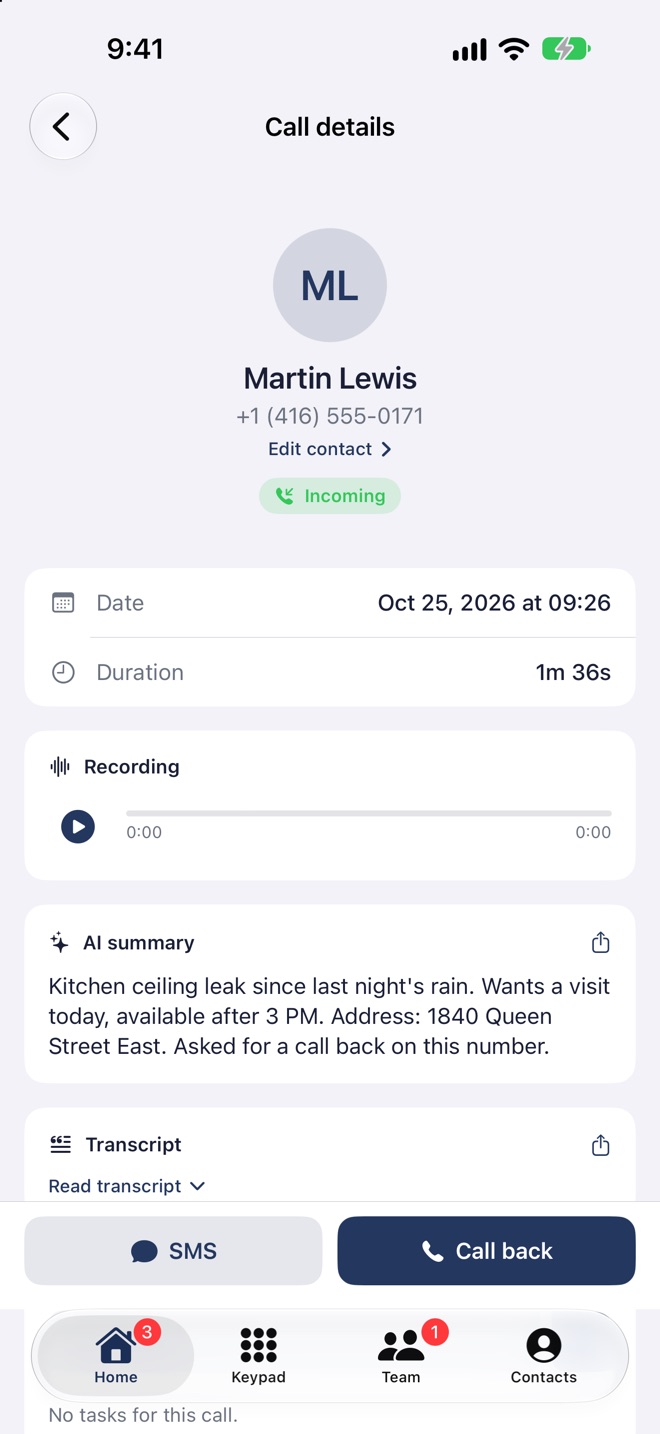
Transcription
Martin Lewis · 1:36Speaker 1
Harper Renovations, good morning! How can I help?
Speaker 2
Hi, my kitchen ceiling has been leaking since last night’s rain.
Speaker 1
I understand, that’s urgent. What’s your address?
Speaker 2
1840 Queen Street East. Otherwise, my cell is 416-555-0190.
Read back any call.
Every call is transcribed, voice by voice, with a summary and suggested tasks. No more taking notes.
Included from Solo
Transcription is on by default
Two separate voices
Who said what, one under the other
Up to 3 tasks
Suggested after every call
French and English
Even when the call switches between them
No more taking notes during the call.
Before
- Writing while the customer talks
- Forgetting an address or a number
- Replaying the call to find a detail
- Copying tasks by hand
With Callizy
- The call text, voice by voice
- A summary of a few lines
- Up to three suggested tasks, created in one click
- Everything stays in the customer’s conversation
Call from Martin Lewis · 1:36
Today, 9:26 AM
AI summary
Kitchen ceiling leak since last night’s rain. Wants a visit today, available after 3 PM. Address: 1840 Queen Street East.
Suggested tasks
- Call Mr. Lewis back to confirm 3:30Create
- Bring the thermal cameraCreate
The summary and tasks, nothing to type.
After a recorded call, a short summary lands in the customer’s conversation. The AI suggests up to three tasks: one click, and the task is created.
- A summary in the language of the call
- Up to three suggested tasks, created in one click
- The summary, copied in one tap
 Transcription
Speaker 1
Harper Renovations, good morning!
Speaker 2
Bonjour, est-ce que vous parlez français ?
Speaker 1
Oui, bien sûr. Comment puis-je vous aider ?
Speaker 2
J’aimerais une soumission pour une terrasse d’environ 30 m².
Who said what, in English or French.
The transcript separates the two voices on the call. French and English are recognized automatically, even when the call switches between them.
- Each turn of the conversation, one under the other
- Team calls, AI agent calls and voicemails
- On your computer and on iPhone
Main line/SettingsCall recording
Team calls on this number.
Automatic transcription
The text of every call, readable in the history.
AI summary after the call
A summary of a few lines, from the transcript.
Notice at the start of the call
“For quality assurance, this call may be recorded.”
You choose number by number.
Recording, transcription and summary each have their own switch in the number’s settings. For team calls, recording must be on.
- A switch for each setting
- Transcription is on by default
- An announcement tells the caller about the recording
Included from the Solo plan
$19per user, per month
Billed yearly, in Canadian dollars. 14-day free trial.
- Transcripts of calls and voicemails
- A summary after every call
- Suggested tasks, created in one click
For team calls, recording must be on for the number.
Before you start
Do calls need to be recorded?
For team calls, yes: the transcript is made from the recording. AI agent calls and voicemails are transcribed too.
Are my customers told about the recording?
Yes. An announcement plays at the start of the call, and you can write your own in the number’s settings.
Which plan do I need?
Transcripts, summaries and suggested tasks are included from Solo.
See also
Your number is ready in three minutes.
14-day trial. Your current number is ported. Support in French and English, from Montréal.
The app, on iPhone and Android:

